Product Icon

Multi-Currency Switcher for WooCommerce

Auto-detect currency based on country with WooCommerce currency switcher & let your potential customers switch currencies on the go.
Choose a billing option
$99
Save 20%
$198 $158.40

Subscription includes

  • Product updates and improvements
  • Customer support
  • 30-day money-back guarantee

Enable multiple currencies on your WooCommerce store without coding

Multi-Currency Switcher for WooCommerce is the ultimate currency solution for international stores. It comes with a currency converter, currency switcher, additional conversion fee, price based on country, auto-update exchange rate, custom price rounding, checkout permission for different currencies, payment methods, and more.
Live Demo | Admin Demo

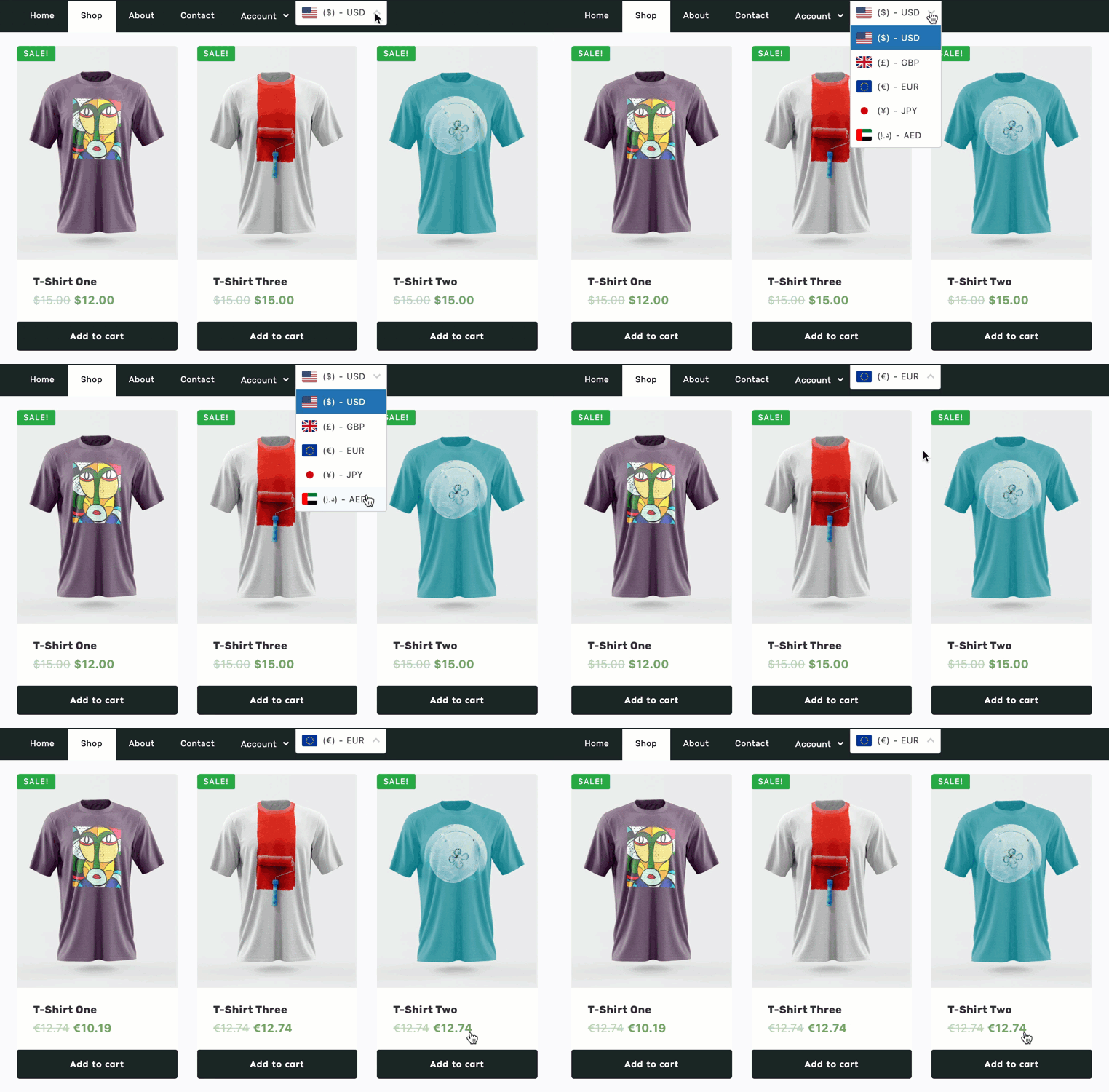
Change currency in WooCommerce currency switcher on shop page header menu

Also known as YayCurrency, Multi-Currency Switcher is a must-have extension for your WooCommerce store! It helps keep your customers happy no matter where they’re from.

Your customers can switch currencies and select the most practical unit instead of seeing pricing only in one currency.
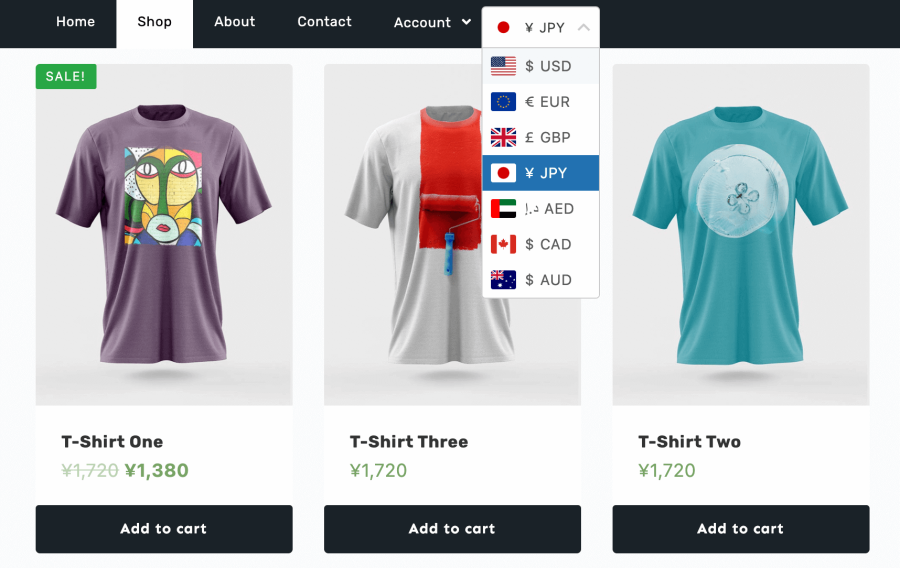
WooCommerce currency switcher on Shop page top menu dropdown

Features

WordPress currency switcher plugins are popular as you have more control over how currency options are displayed on your WooCommerce website and offered to your customers. If you sell to international customers who aren’t familiar with converting between different currencies, a WooCommerce currency plugin will be a solution that everyone can benefit from.

Automate currency conversion

Save time with scheduled periodic, automatic updates of currency exchange rates. You can also quickly set up fixed rates, and additional conversion fees by percentage/fixed amount to compensate for the local exchange services.

User-friendly settings

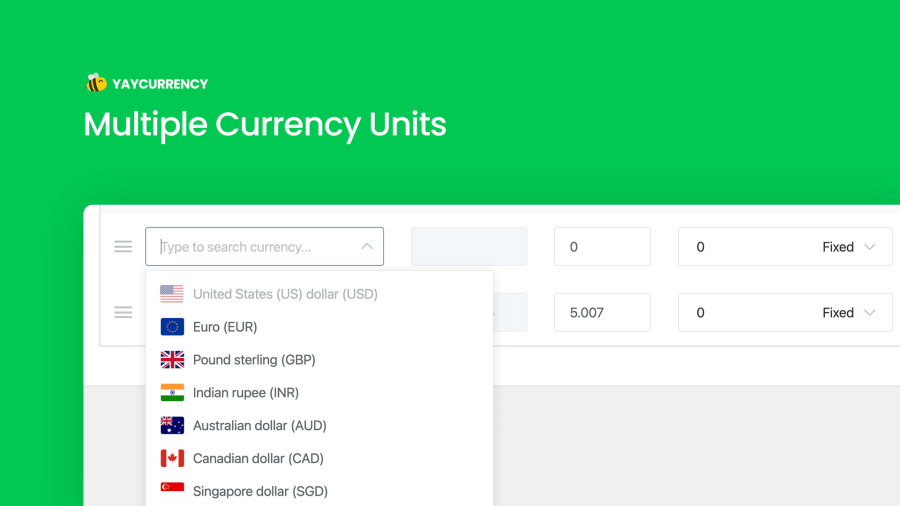
Easily add new currency from the dropdown list of 160+ national currency units. Drag and drop to organize them in order to show the prioritized ones first in your shop.

Switch currencies at checkout

Allow changing currencies at checkout so customers can pay with their preferred currency. You can also pick suitable payment methods for each currency.

Mobile-friendly

Compatible with all major themes. Display the currency switcher including national flags at header, top menu, footer, footer widget, and so on.

Custom rounding

YayCurrency’s built-in price rounding features with live preview and testing help you set up price endings to tailor the currency styles to the well-grounded common sense.

Comprehensive analytics by currency

A variety of WooCommerce reports and analytics will show a breakdown of sales by currency, allowing month-to-month or year-to-year comparisons, to help identify patterns and changes in sales.

Intuitive design

We apply the best patterning practices in crafting WordPress UI/UX designs, so you don’t have to struggle to set them up.

How Does WooCommerce Multi-Currency Switcher Work?

It starts with a top-notch simplified user interface to set up currency conversion fees and formatting options
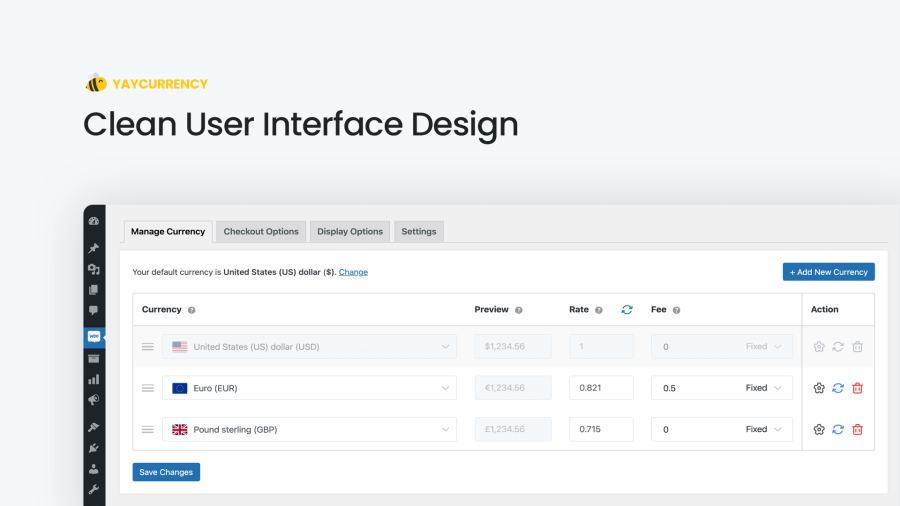
Manage WooCommerce multi currency
Manage WooCommerce multi currency with YayCurrency’s drag and drop interface


Easily drag and drop currencies in the back end to reorder them on the front end. Place the currency switcher in different spots on your storefront.
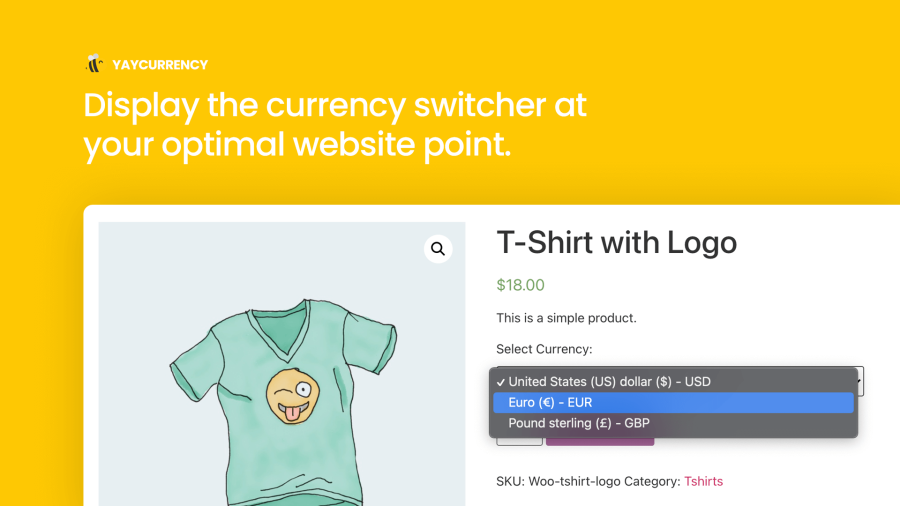
Display WooCommerce currency switcher on product page


Add unlimited currencies and customize the converted price ending to serve your psychological trick.

Adding unlimited local currencies to WooCommerce website
Adding unlimited currencies to the currency switcher for your WooCommerce website


Config currency formatting, custom rounding, and psychological price ending in a single panel. Quickly preview each currency format display.
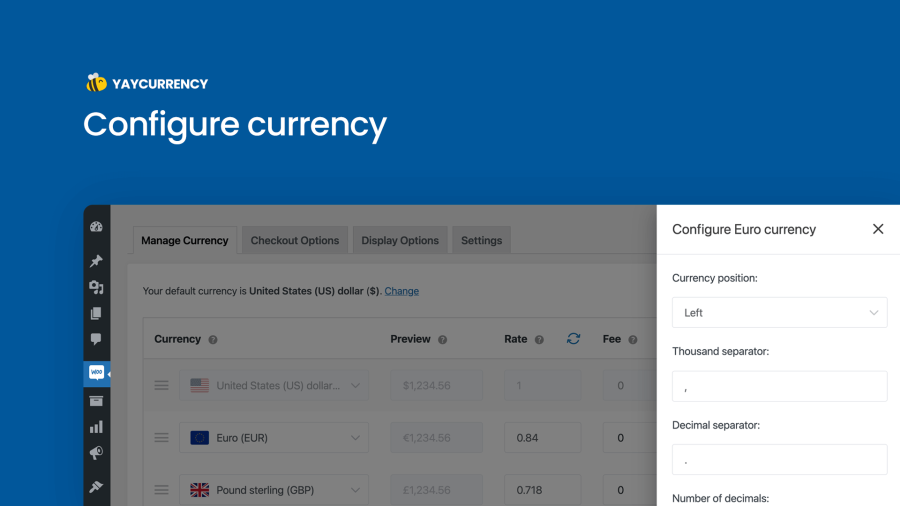
Configure currency display, custom rounding and other formatting options
Configure currency display, custom rounding, and other formatting options


Set checkout permissions depending upon each currency and its available payment methods.
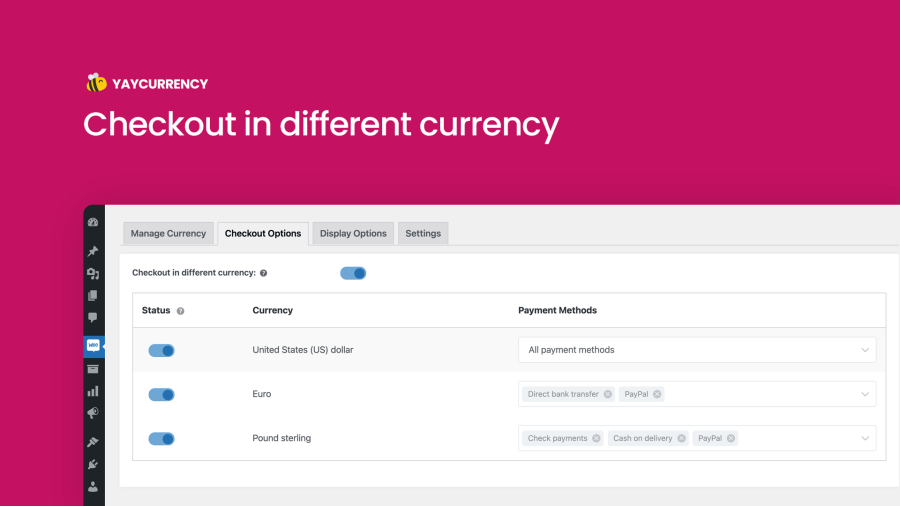
Allow checkout in local currency based on payment methods
Allow the customers to pay in their local currency based on selected payment methods

✅ Well done! YayCurrency comes with advanced options that are readily configured via simple on/off buttons. It only takes moments to get it up and running with some clicks and switches.

Here’s a breakdown of how this multi-currency switcher benefits you and your business:
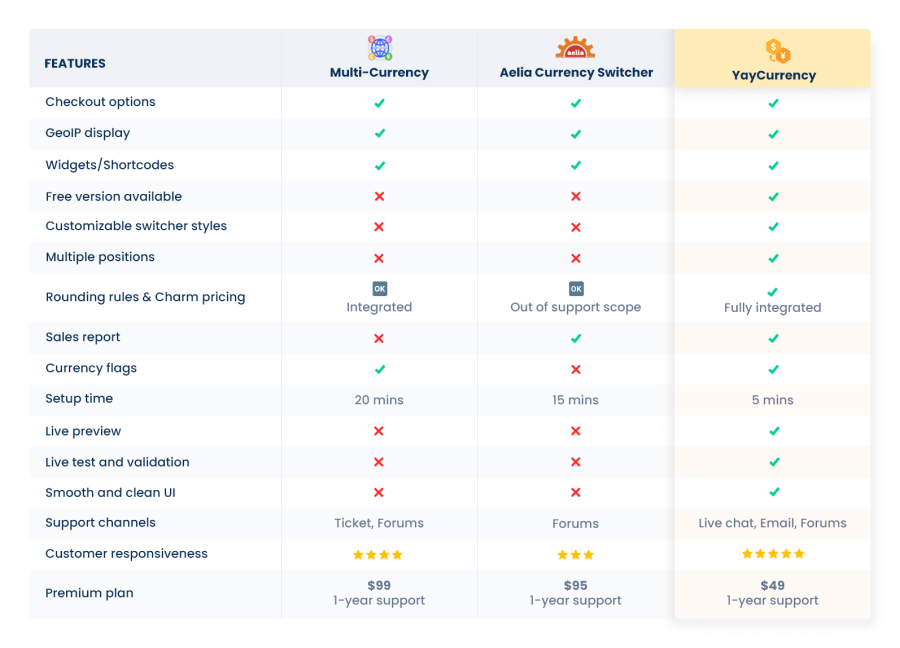
YayCurrency Comparison Table
WooCommerce comparison table featuring the most popular currency switcher plugins

WooCommerce Currency Switcher made easy

Multi-Currency Switcher for WooCommerce allows you to set a list of different currencies as a dropdown select with national flags, currency symbols, currency codes, and more. You can place them on shop pages so customers can easily switch between different currencies that calculate automatically based on the current exchange rates.

It takes only a few clicks to install and activate Multi-Currency Switcher. Rest assured, as we provide VIP live chat support to integrate YayCurrency with your favorite theme! Then you can do all of these without having to code:

  • Use live exchange rates which are updated automatically.
  • Manually force exchange rate update, or add your own foreign exchange figures.
  • Add conversion fees to prevent cash discrepancy when converting payments to your local currency via your bank or payment processors.

Why YayCurrency is the best currency switcher for WooCommerce?

The strong point of this WooCommerce currency switcher plugin is its simplicity and ease of use. Moreover, it has extended compatibility with WooCommerce extensions:
  • WooCommerce Payments
  • WooCommerce Subscriptions
  • Measurement Price Calculator
  • Name Your Price
  • Mollie Payments for WooCommerce
  • PayPal Payments
  • Product Add-Ons
  • YITH WooCommerce Points and Rewards
  • YITH WooCommerce Product Add-ons
  • WP Grid Builder Caching
  • JetSmartFilters
  • WooCommerce FedEx Shipping Plugin with Print Label
  • WooCommerce Custom Product Addons
  • Woo Cart Product module of Divi theme
  • B2BKing – WooCommerce B2B & Wholesale Plugin
  • CartFlows plugin
  • LearnPress
  • Pay for Payment for WooCommerce
  • Wholesale Pro by Barn2
  • CTX Feed
  • Users Insights
  • Request a Quote for WooCommerce
  • Event Tickets
  • Slovak Parcel Service
  • Buy Once or Subscribe for WooCommerce Subscription
  • Woo Product Bundles
  • WooCommerce Deposits
  • WooCommerce Simple Auctions
  • LiteSpeed Cache
  • WPML
  • Polylang

FAQs

Can I set fixed product prices to be displayed in each currency?

  • Yes, with this WooCommerce multi currency plugin, you can add a fixed price to a specific simple product or each variation of variable products. The settings can be found in WooCommerce → Products → Edit product.

Is there a shortcode for displaying the WordPress currency switcher in a specific location?

Try it, love it, or your money back! That’s our promise.

We’ll happily offer you a full refund within 30 days of your purchase. No questions asked. Chat with us →


Customer reviews

Average rating 3.7
3 reviews
5 stars, 67% of reviews
4 stars, 0% of reviews
3 stars, 0% of reviews
2 stars, 0% of reviews
1 star, 33% of reviews
3 reviews
  • anchorsbook
    Rated 5 out of 5
    Support
    Nov 2, 2024
    Support
    Did not work
    friendly support
    • yaycommerce
      Jul 9, 2024
      Hi there, We’re terribly sorry that you're not having a great experience with our plugin. Did you get in touch with our Woo experts via live chat at yaycommerce.com? Our tech team is always ready to spring into action and fix the glitches. If you could tell us a bit more about what happened, we’ll be able to step in and fix things up ASAP. Think of it as a team effort: you share the details, and we’ll handle the rest. Just let us know when you’re ready to chat, and we’ll be here with open ears (and tech expertise!) We can’t wait to hear from you! Thanks and best regards, YayCommerce Support Team
  • lfourcade
    Rated 1 out of 5
    Mar 17, 2023
    Breaks my website cache (WP Rocket)
    I only noticed a few weeks after installing Yay that my site page loading time was damn slow. I contacted the support, explaining exactly how their messy code was breaking my site, pointing a wrong cookie lable, and they did nothing. 4 months later I am still paying this plugin for nothing as I can't use it. Asking a refund...
    • yaycommerce
      Jul 9, 2024
      Hi, We’re terribly sorry that you're not having a great experience with our plugin. Here's the thing: achieving perfect plugin compatibility requires a two-way street. YayCurrency plugin developers work hard to ensure compatibility with the latest version of WordPress, WooCommerce, and many major plugins. Even so, we cannot guarantee to minimize potential conflicts with all cache plugins out there. Most likely, we need the cooperation from your third party plugins. At YayCommerce, we always provide the best and fastest support we can. That said, we are not forcing you to keep the subscription if it is not useful to you. And through WooCommerce.com, you can always ask for a refund and get app...
  • jrhogstad
    Rated 5 out of 5
    Jul 19, 2022
    Just what I needed
    Having a shop selling to the whole world this was just the plugin I needed.

Related Products

Price $279 annually
Rated 3.2 out of 5 stars
Price $79 annually
Rated 3.4 out of 5 stars
Price $59 annually
Rated 3.1 out of 5 stars
Price $109 annually
Rated 2.8 out of 5 stars
Price $49 annually
Rated 4.1 out of 5 stars
Price $109 annually
Rated 2 out of 5 stars
Price $109 annually
Rated 2.3 out of 5 stars
Price $109 annually
Rated 2.6 out of 5 stars
Price $109 annually
Rated 2 out of 5 stars